

YellowDawido
-
Postów
13 -
Dołączył
-
Ostatnia wizyta
-
Wygrane w rankingu
1
Osiągnięcia YellowDawido

Mitu (1/14)
3
Reputacja
-
 YellowDawido zmienił(a) swoje zdjęcie profilowe
 -
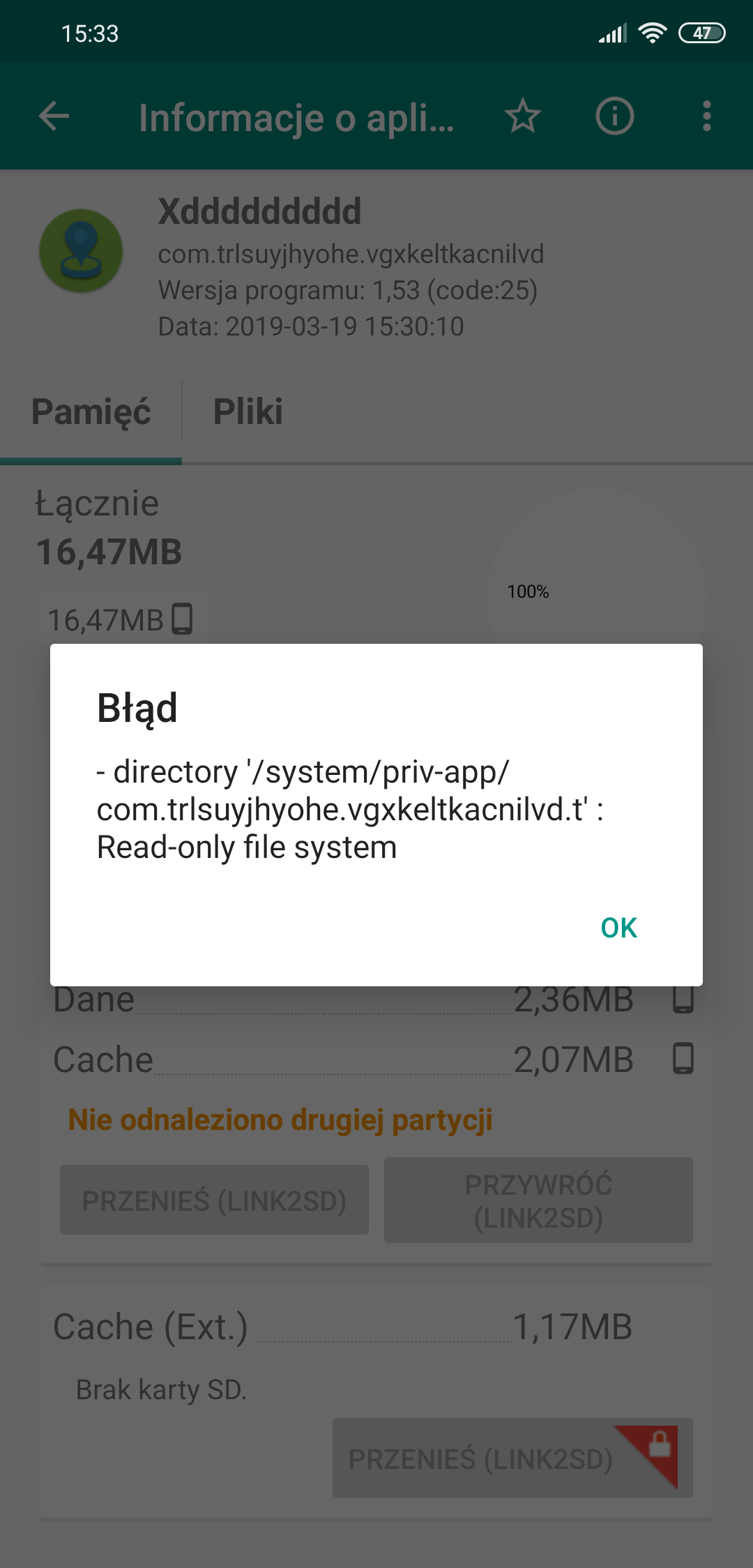
Błąd przy konwertowaniu aplikacji na systemową
YellowDawido odpowiedział(a) na YellowDawido temat w Problemy techniczne
Problem rozwiązany w twrp trzeba było naprawić uprawnienia -
Błąd przy konwertowaniu aplikacji na systemową
YellowDawido opublikował(a) temat w Problemy techniczne
Witam mam problem otóż po ostatniej aktualizacji systemu do wersji 9.3.14 dzisiaj zrobiłem ponownie roota moduł którego używam działa ale niestety nie mogę przekonwertować jednej z aplikacji na systemową dziwi mnie to, ponieważ na poprzedniej wersji nie było takiego problemu. Jest to błąd Read-only file system proszę o pomoc zależy mi na tym by przekonwertować ją.
-
Zapomniany kod do odblokowania telefonu
YellowDawido odpowiedział(a) na YellowDawido temat w Problemy techniczne
telefon odblokowany sposobem Hi, Thank you for contacting Xiaomi Customer Support and sharing the snapshots with us. I am Saloni and sorry to know that your device is locked. I would request you to follow below mentioned steps: 1. On the screen of selecting WiFi network, select your network. Get connected. 2. Then hit "modify", and hit "change password" field. 3. Tap "show password" button, then type your phone number (or any other one). 4. Long tap and hit "call". A caller app is loaded. 5. Hit Save contact. 6. Tap the contact, then hit "share". 7. Choose Gmail app (note: adding Gmail account won't work from there, tried that). 8. Choose "Exchange". Type your email address (or any other one). 9. On the next screen (password selection), hit "select" to choose a certificate. 10. At this moment a device locking screen will be brought up. Change the lock to a PIN number. !!!Voila!!! 11. Then go back to the beginning of the phone setup process and add Google account with no extra questions. I hope this troubleshooting will be helpful for you and for any further assistance, feel free to contact us. -
Zapomniany kod do odblokowania telefonu
YellowDawido odpowiedział(a) na YellowDawido temat w Problemy techniczne
ok sprawa wygląda tak z tymi kontami po full wipe wyskakuje okno device locked po czym klikam to verify account loguje się na konto xiaomi i normalnie konfiguracja tzn start-> język polski ->region polska->połącz z siecią dodaje wifi swoje-> warunki użytkowania akceptuje-> sprawdzanie karty sim czy mam włożoną czy nie przechodze dalej -> i teraz powinna być opcja dodania konta google a tu co kopiowanie aplikacjii i danych znowu czy klikne nie kopiuj czy kopiuj->POTWIERDŹ SWOJE HASŁO !!! i tu staje wszystko bo go zapomniałem -
Zapomniany kod do odblokowania telefonu
YellowDawido odpowiedział(a) na YellowDawido temat w Problemy techniczne
pytałem o naprawe gwarancyjną stwierdzili że nie działa na to gwarancja. kontaktowałem się z mi center i pan powiedział że nie mają pojęcia jak to obejść więc telefon raczej jak sobie nie przypomne pinu do kosza kur!!! Da się wgrać tego globala gdy mam zablokowany bootloader? -
Zapomniany kod do odblokowania telefonu
YellowDawido odpowiedział(a) na YellowDawido temat w Problemy techniczne
w żadnym serwisie nie pomogą czy jest jakaś opcja rozmowy z kimś od google albo xiaomi żeby zdjął mi tą blokade? -
Zapomniany kod do odblokowania telefonu
YellowDawido odpowiedział(a) na YellowDawido temat w Problemy techniczne
Kurde to wczoraj wysłałem zgłoszenie do tego serwisu Tak tylko nawet jak zainstaluje to i tak nie mogę w nią wejść cholerka Wiecie może w jaki sposób przez tą przeglądarkę mógłbym włączyć ta przeglądarkę od googla przez którą można przejść do ustawień -
Zapomniany kod do odblokowania telefonu
YellowDawido odpowiedział(a) na YellowDawido temat w Problemy techniczne
Słuchaj jest taka opcja bo przez jakieś privacy polityc itp udało mi się dostać do przeglądarki jest jakaś opcja przez tą przeglądarkę przejść np do ustawień? -
Zapomniany kod do odblokowania telefonu
YellowDawido odpowiedział(a) na YellowDawido temat w Problemy techniczne
Jak mam to zrobić gdzie się zgłosić ile to może kosztować? -
Zapomniany kod do odblokowania telefonu
YellowDawido odpowiedział(a) na YellowDawido temat w Problemy techniczne
tak mam globala nie mam pojecia jak to obejść a pinu za cholere nie pamiętam myślicie że jakiś serwis pomoże jak tak to jaki? A może jest jakaś hardcore wersja żeby odblokować bootloader albo coś co by bardzo na hard reset podziałało? -
Zapomniany kod do odblokowania telefonu
YellowDawido odpowiedział(a) na YellowDawido temat w Problemy techniczne
Problem w tym że ja wogole nie mogę się dostać na żadne konto Google bo ten pieprzony telefon chce kod a z Google jest tylko kopia i tyle nie wiem gdzie mogę wysłać film to bym ci pokazał -
Zapomniany kod do odblokowania telefonu
YellowDawido odpowiedział(a) na YellowDawido temat w Problemy techniczne
Nie chodzi mi o dane bo je mam w d*pie ale nie mogę normalnie korzystać z telefonu nawet po full wipe na końcu konfiguracji telefon i tak prosi o kod hasło -
Witajcie posiadam xiaomi mi 8 Dipper na miui 10.2.2 z andkiem pie mam problem mianowicie całkiem z głowy wypadł mi pin blokady odblokowywania telefonu żeby móc z niego korzystać. robiłem wipe przez recovery skutek restart przebiegł pomyślnie natomiast przechodząc przez konfiguracje wyskakuje mi że mój tlefon ma blokade konta po czym loguje sie na konto xiaomi i dokańczam konfiguracje telefon przechodzi do momentu pytania mnie czy chce wgrać kopie mojich plików tu już chodzi o google czy klikam nie czy klikam tak chce kopie ukazuje mi się potwierdz swoje hasło a jak już mówiłem pinu nie pamiętam telefon ma zablokowany bootloader jak moge to obejść bo już nie mam siły Pozdrawiam Dawid